
COND
Introduction
The COND “operator” is not actually an operator. It represents a flow of control node in the execution plan for a code unit (batch, stored procedure, trigger, or user-defined function) that consists of multiple statements and that depends on a simple test. If the condition is query-based, then the COND WITH QUERY “operator” is used instead. The COND “operator” is not used in an execution plan with run-time statistics (“actual execution plan”), but only in an execution plan only (“estimated execution plan”).
The COND “operator” can be used for an IF … ELSE statement, for an IF statement without ELSE, and for a WHILE statement. In graphical execution plans, they all look the same. In the XML representation, the version for IF … ELSE looks different, but the versions for IF without ELSE and WHILE still look the same. I assume that the actual internal execution plan does have a property to distinguish these, but it seems that Microsoft failed to include it in the transformation to XML.
Visual appearance in execution plans
Depending on the tool being used, the COND “operator” is displayed in a graphical execution plan as shown below:
|
SSMS and VS Code |
Legacy SSMS |
Plan Explorer |
Paste The Plan |
 |
 |
 |
(no icon) |
Algorithm
The basic algorithm for the COND “operator” is as shown below:
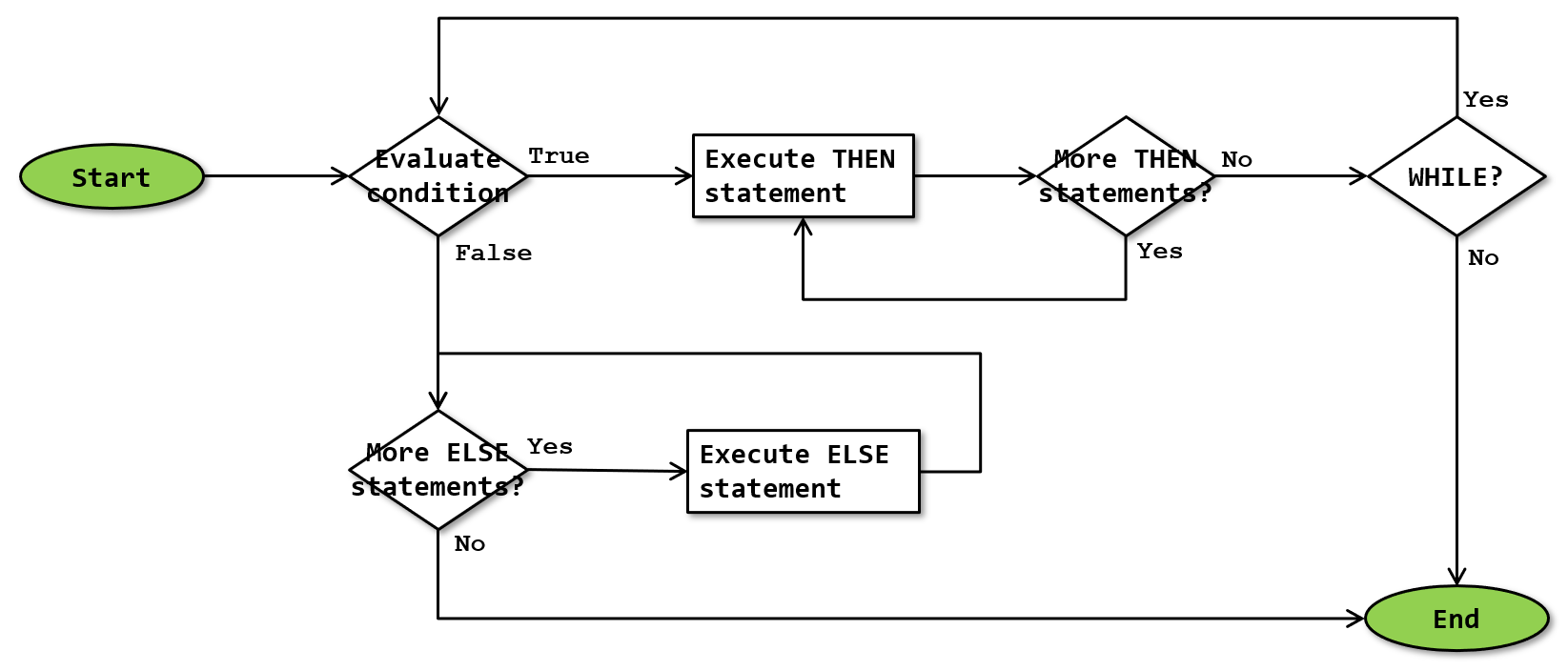 Note that I have combined the execution logic for IF … ELSE, IF without ELSE, and WHILE all in this single flowchart. It is possible that the actual implementation uses two simpler separate algorithms for WHILE and for IF, or even three algorithms for each of the three cases.
The flowchart suggests that a single COND “operator” can combine WHILE and ELSE processing. That is not the case. The two options are mutually exclusive.
Evaluate condition
The condition to be evaluated is not visible in the graphical execution plan, nor in the execution plan XML. I assume that this is an omission in the transformation of the internal execution plan to its XML representation.
Execute THEN statement and More THEN statements?
Any COND “operator” always has a <Then> subnode in the execution plan XML. This subnode then has a <Statements> subnode, that contains one or more <StmtSimple> subnodes. If the condition evaluates to True, then all these statements are executed sequentially.
In the graphical representation of the execution plan, the <Then> and <Statements> nodes are not represented. Each of the <StmtSimple> subnodes with their child tree is represented as a direct child of the COND “operator”.
WHILE?
If the COND “operator” is used for a WHILE statement, then execution returns to Evaluate condition after all statements in the <Then> subnode have been executed. Execution repeats if the condition still evaluates to True, or stops otherwise.
If the COND “operator” is used for an IF statement, then execution always ends after a single execution of either the <Then> subnode or the <Else> subnode.
The difference between an IF without ELSE and a WHILE is not visible in the graphical execution plan, nor in the execution plan XML, except by looking at the (potentially truncated) text in the Statement property. I assume that the internal execution plan does represent this, but Microsoft failed to include it in the XML representation.
More ELSE statements and Execute ELSE statement
A COND “operator” for an IF … ELSE has an <Else> subnode in the execution plan XML. This subnode then has a <Statements> subnode, that contains one or more <StmtSimple> subnodes. If the condition evaluates to False or Unknown, then all these statements are executed sequentially.
A COND “operator” for an IF without ELSE or for a WHILE does not have an <Else> subnode. The “More ELSE statements” test fails instantly and nothing is executed.
In the graphical representation of the execution plan, the <Else> and <Statements> nodes are not represented. Each of the <StmtSimple> subnodes with their child tree is represented as a direct child of the COND “operator”.
Confusing representation
The XML representation of the execution plan uses a <Then> subnode to encapsulate the statement(s) that are conditionally executed if or while the condition is True, and an optional <False> subnode to encapsulate the statement(s) to be executed when the condition is False or Unknown. In the graphical representation, the <Then> and <Else> subnodes are not shown. The plan simply shows each statement in the <Then> subnode as a direct child of the COND “operator”, followed by each statement in the <Else> subnode.
As a result, a graphical execution plan that shows a COND “operator” with four child subtrees can mean any of the following:
- A WHILE loop that repeats all four statements as long as the condition is True.
- An IF without ELSE that executes all four statements when the condition is True.
- An IF … ELSE that executes the first three statements when the condition is True, or the last one when the condition is False or Unknown.
- An IF … ELSE that executes the first two statements when the condition is True, or the last two when the condition is False or Unknown.
- An IF … ELSE that executes the first statement when the condition is True, or the last three when the condition is False or Unknown.
If you look at the execution plan XML, then options 1 and 2 still look identical, but the others can all be distinguished from each other by looking at which statement(s) are encapsulated in the <Then> subnode, and which are in the <Else> subnode.
Operator properties
COND is not an actual operator, but a control of flow node in the execution plan. As such, it has some of the properties that apply to the execution plan as a whole, which can be found here. In addition, it has the properties listed below. Some of these are not shown as properties in the graphical execution plan, but as nodes in the execution plan XML.
Properties that are included on the Plan properties page but are also included below for their specific meaning for the COND “operator” are marked with a *.
| Property name | Description |
|---|---|
| Condition | This property is not exposed in the graphical execution plan, but can be found in the XML representation of the execution plan. For the COND “operator”, the Condition property is always empty. I assume that the actual internal representation of the execution plan does include the condition, but it is not included in the transformation to the XML representation. As a result, the graphical representation can’t show the Condition either. |
| Else | This subnode encapsulates all the <StmtSimple> subtrees to be executed if the Condition evaluates to False or Unknown. This property is optional. The <Else> property is not shown in the graphical representation of the execution plan. If it exists in the execution plan XML, then its descendant <StmtSimple> subtrees are shown as direct descendants of COND. |
| Estimated Number of Rows * | The Estimated Number of Rows property (which in most other cases is displayed as Estimated Number of Rows per Execution) is always zero for the COND “operator”. Each of its subtrees has its own Estimated Number of Rows per Execution, but they are not aggregated in the COND “operator”. |
| Estimated Operator Cost * | The Estimated Operator Cost property is always zero for the COND “operator”. |
| Estimated Subtree Cost * | The Estimated Subtree Cost property is always zero for the COND “operator”. Each of its subtrees has its own Estimated Subtree Cost, but they are not aggregated in the COND “operator”. |
| Statement * | In cases where it is unclear whether a COND “operator” is used for an IF without ELSE or for a WHILE, looking at the Statement property might sometimes help. However, if the statement is preceded by a long comment, then the text of the Statement property might be truncated before the IF or WHILE keyword. |
| StmtSimple | This is a subnode of either the <Then> or of the <Else> property. It occurs one or more times in the <Then> property, and one or more times in the <Else> property if one is present. It encapsulates the execution plan for one of the statements to be executed when or while the Condition evaluates to True if it is a subnode of <Then>; or one of the statements to be executed when the Condition evaluates to False or Unknown if it is a subnode of <Else>. |
| Then | This subnode encapsulates all the <StmtSimple> subtrees to be executed if or while the Condition evaluates to True. This property is mandatory. The <Then> property is not shown in the graphical representation of the execution plan. Its descendant <StmtSimple> subtrees are shown as direct descendants of COND. |
Change log
(Does not include minor changes, such as adding, removing, or changing hyperlinks, correcting typos, and rephrasing for clarity).
August 24, 2026: Added.