
Cursor
Introduction
The Cursor icon is not actually an operator. It is just an icon, similar to Language Element, but used specifically for cursor statement that do not need their own dedicated execution plan: OPEN, FETCH, CLOSE, and DEALLOCATE. These
Visual appearance in execution plans
Depending on the tool being used, the Cursor icon is displayed in a graphical execution plan as shown below:
|
SSMS and VS Code |
Legacy SSMS |
Plan Explorer |
Paste The Plan |
 |
 |
 |
 |
(Note that current and legacy SSMS, VS Code, and Plan Explorer all reuse this same icon for the Fast Forward “operator”. Paste the Plan also uses a generic cursor icon for that “operator”, but, as seen above, uses its even more generic Language Element icon for other cursor statements.)
Algorithm
The cursor icon is not an actual operator and is hence not executed. It is only used to represent the OPEN, FETCH, CLOSE, and DEALLOCATE cursor statements in an execution plan only.
The OPEN statement is executed by loading and executing the Population Query subplan that was generated or retrieved from cache for the DECLARE CURSOR statement. An execution plan with run-time statistics will show this subplan. Note that some cursor types do not generate a Population Query subplan; in that case, the OPEN statement is a no-operation.
The FETCH statement is executed by loading and executing the Fetch Query subplan that was generated or retrieved from cache for the DECLARE CURSOR statement. An execution plan with run-time statistics will show this subplan.
The CLOSE and DEALLOCATE statements are simple statements that don’t need an execution plan. The statement is stored in the Statement property of the operator. Execution of these statements is not shown in an execution plan with runtime statistics.
If you do want to imagine the Catchall “operator” executing, the logic would look like this:
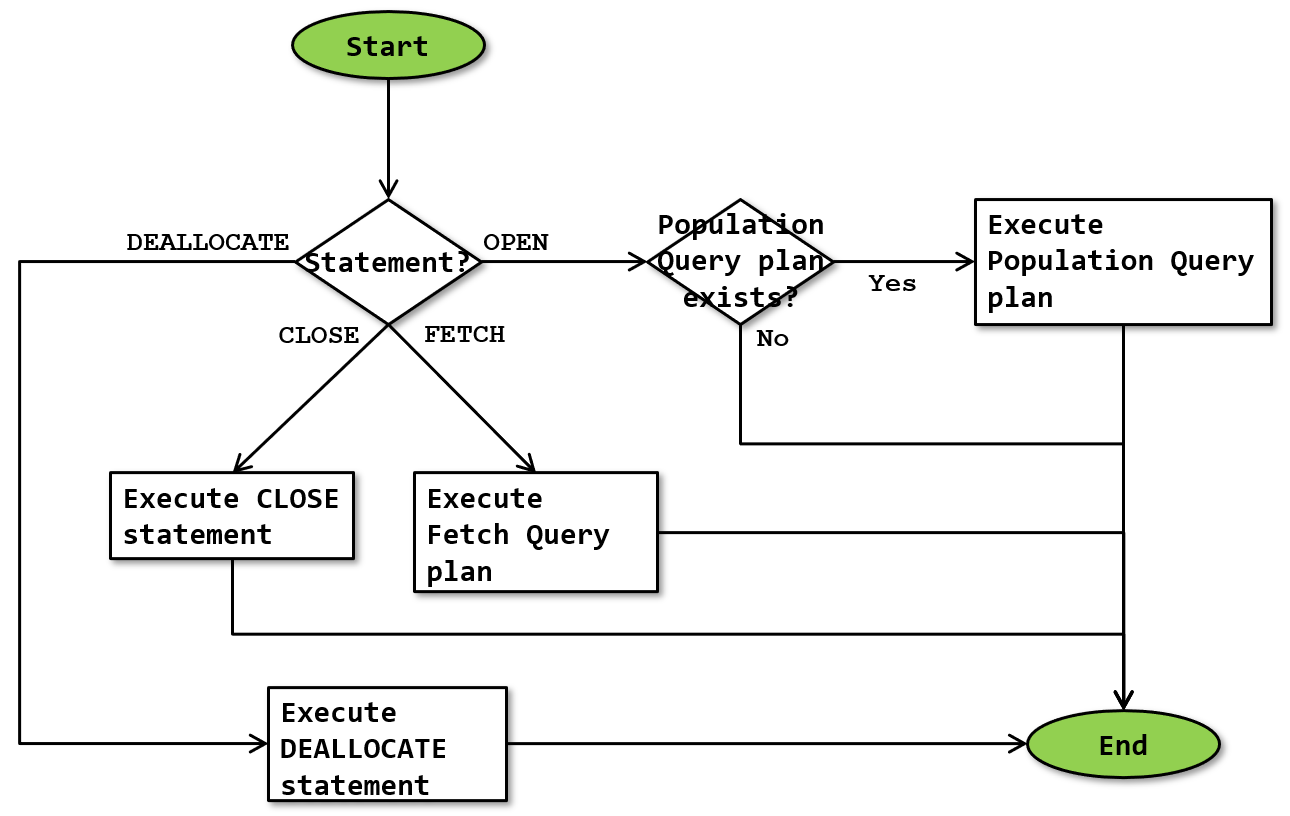 Statement?
As far as currently known, the Catchall icon is only used to represent either of the OPEN, FETCH, CLOSE, and DEALLOCATE cursor statements, and only in an execution plan only.
Population Query plan exists?
Depending on the cursor type, there may or may not be a Population Query subplan for the cursor. If not, then the OPEN statement effectively becomes a no-op.
Execute Population Query / Fetch Query plan
The execution engine fetches either the Population Query subplan or the Fetch Query subplan for the cursor and then executes it.
Execute CLOSE / DEALLOCATE statement
The execution engine directly executes either the CLOSE or the DEALLOCATE statements. These are simple statements that do not use an execution plan similar to the processing of the Language Element “operator”.
Operator properties
Catchall is an icon that can represent multiple statements. However, it still has some of the properties that apply to the execution plan as a whole, which can be found here. In addition, it has the following cursor-specific property:
| Property name | Description |
|---|---|
| Cursor Name | The name assigned to the cursor in the DECLARE CURSOR statement. |
Change log
(Does not include minor changes, such as adding, removing, or changing hyperlinks, correcting typos, and rephrasing for clarity).
September 19, 2026: Added.