
Fast Forward
Introduction
The Fast Forward “operator” is not actually an operator. It is the equivalent of the Language Element “operator” for the container of a fast forward cursor. The Fast Forward operator is not used in an execution plan with run-time statistics (“actual execution plan”), but only in an execution plan only (“estimated execution plan”).
Any of the cursor “operators” (Dynamic, Fast Forward, Keyset, and Snapshot) are containers for one or two subtrees, to be executed when the cursor is opened or whenever a row is fetched. The Fast Forward “operator” has either one or two child nodes. In the latter case, the first child operator is always a Population Query “operator”, that is then the parent operator of the execution plan that is executed when you OPEN the cursor; and the second child operator is a Fetch Query “operator”, with the subtree that runs for a FETCH statement. In the former case, the only child operator will be a Fetch Query “operator” and its subtree.
The behavior of a fast forward cursor can be either similar to a static cursor (in which case both the Population Query and the Fetch Query subtree are used), or similar to a dynamic cursor (where only the Fetch Query subtree is needed). This choice is determined at run time, based on the estimated plan cost of the two alternatives, as described in more detail here. The effect of this run time choice is that it is impossible to predict whether a fast forward cursor will see concurrent updates or not.
There are no properties on the Fast Forward “operator” itself to distinguish the static from the dynamic behavior, although it is clearly implied by the number of child operators. Only a Fetch Query means dynamic behavior; Population Query plus Fetch Query means static behavior.
Visual appearance in execution plans
Depending on the tool being used, the Fast Forward “operator” is displayed in a graphical execution plan as shown below:
|
SSMS and VS Code |
Legacy SSMS |
Plan Explorer |
Paste The Plan |
 |
 |
 |
 |
(Note that current and legacy SSMS, VS Code, Plan Explorer, and Paste the Plan all lack a dedicated icon for the Fast Forward “operator”, and hence use their generic Cursor icon.)
Algorithm
The Fast Forward “operator” is never really executed. All cursor operators (Dynamic, Fast Forward, Keyset, and Snapshot) are containers for one or two subtrees, starting with either the Population Query or the Fetch Query “operator”. In the case of Fast Forward, the former is only used when the compiler decides that the static execution option is the cheapest.
If you do want to imagine the Fast Forward “operator” executing, the logic would look like this:
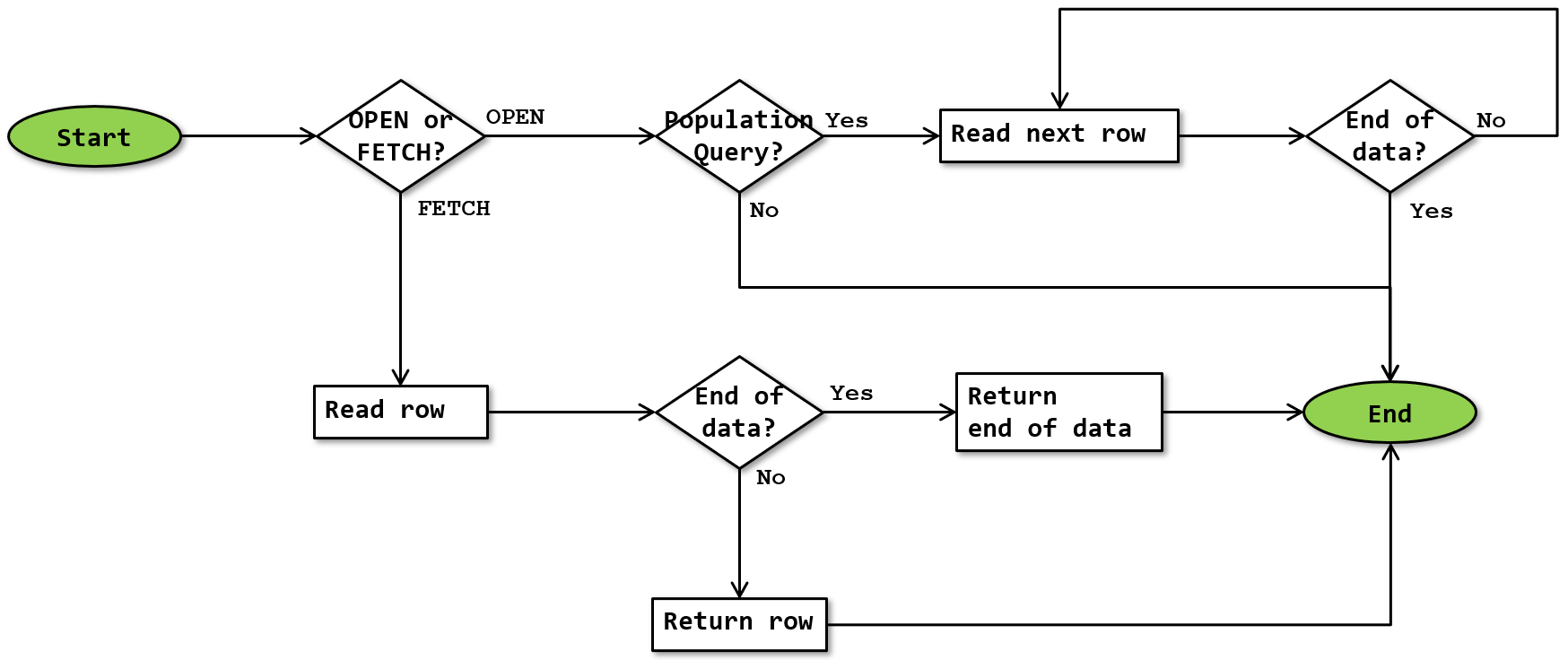 OPEN or FETCH
When the OPEN statement is executed, Fast Forward invokes the Population Query input tree, if one exists in the execution plan (that was compiled by executing the DECLARE CURSOR statement). If there is no Population Query “operator”, then an OPEN statement does nothing.
If it does exist, then if the “operator” returns data at all (it probably doesn’t), Fast Forward simply ignores the returned rows. It keeps invoking the GetNext() method until the end of data signal is received, to ensure that the Population Query finishes populating the internal worktable.
When the FETCH statement is executed, Fast Forward invokes the Fetch Query “operator”, that is its second input if it has two inpuits, or its only input if it has one. This “operator” either returns a single row, or the end of data signal. Fast Forward then passes this to the client.
Read row
Executing the Fetch Query subtree results in either a row returned, or the end of data signal returned. Because the FETCH statements is intended to return just that single row (or nothing), execution does not iterate. The row (or end of data signal) returned by the subtree is returned to the FETCH statement.
Future executions
After the Fetch Query subtree is executed to return a row (or the end of data signal), its operators are not closed. That means that the next execution can automatically continue from the last point, to produce the “next” row in the results.
When the fast forward cursor behaves as a static cursor, then the next execution uses the FETCH_RANGE internal scalar function to determine the position of the next row in the internal worktable, which can then be retrieved by a Clustered Index Seek. Conversely, if the fast forward cursor behaves as a dynamic cursor, it retains the current position of all scan, seek, and lookup operators in the execution plan to read the next row (similar to how a non-cursor execution plan responds when the client application requests the next row).
Operator properties
Fast Forward is not an actual operator, but a container for a cursor definition. As such, it has some of the properties that apply to the execution plan as a whole, which can be found here. In addition, it has the following cursor-specific properties:
| Property name | Description |
|---|---|
| Cursor Actual Type | For the Fast Forward “operator”, this property is equal to “FastForward”. |
| Cursor Concurrency | This property specifies the actual concurrency level of the cursor. For a fast forward cursor, this can only be ReadOnly. |
| Cursor Name | The name assigned to the cursor in the DECLARE CURSOR statement. |
| Cursor Requested Type | The type of cursor that was requested in the DECLARE CURSOR statement. Under certain circumstances, a cursor may be converted from the requested type into a different type. In that case, the Cursor Requested Type will be different from the Cursor Actual Type. |
| Forward Only | When this property is True, the cursor allows only FETCH NEXT statements. This is the only option for a fast forward cursor. |
Change log
(Does not include minor changes, such as adding, removing, or changing hyperlinks, correcting typos, and rephrasing for clarity).
August 5, 2026: Added.
September 19, 2026: Added a note about the generic icon used.