
Dynamic
Introduction
The Dynamic “operator” is not actually an operator. It is the equivalent of the Language Element “operator” for the container of a dynamic cursor. The Dynamic operator is not used in an execution plan with run-time statistics (“actual execution plan”), but only in an execution plan only (“estimated execution plan”).
Any of the cursor “operators” (Dynamic, Fast Forward, Keyset, and Snapshot) are containers for one or two subtrees, to be executed when the cursor is opened or whenever a row is fetched. The Dynamic “operator” always has just one child node, which is always a Fetch Query “operator”. That Fetch Query is then the parent of the execution plan to be executed whenever a FETCH statement is executed. For dynamic cursors, the OPEN statement does not execute any execution plan.
Visual appearance in execution plans
Depending on the tool being used, the Dynamic “operator” is displayed in a graphical execution plan as shown below:
|
SSMS and VS Code |
Legacy SSMS |
Plan Explorer |
Paste The Plan |
 |
 |
 |
 |
Algorithm
The Dynamic “operator” is never really executed. All cursor operators (Dynamic, Fast Forward, Keyset, and Snapshot) are containers for one or two subtrees, starting with either the Population Query or the Fetch Query “operator”. In the case of Dynamic, only the latter is used.
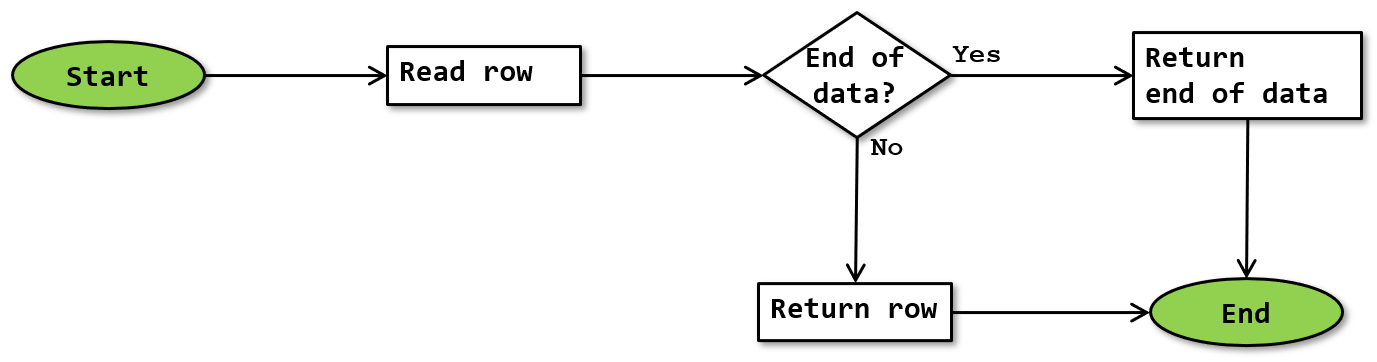
If you do want to imagine the Dynamic “operator” executing, the logic would look like this:
 Read row
Executing the Fetch Query subtree results in either a row returned, or the end of data signal returned. Because the FETCH statements is intended to return just that single row (or nothing), execution does not iterate. The row (or end of data signal) returned by the subtree is returned to the FETCH statement.
Future executions
After the Fetch Query subtree is executed to return a row (or the end of data signal), its operators are not closed. That means that the next execution will automatically continue from the last point, to produce the “next” row in the results.
If the Forward Only property is False (usually because the SCROLL option is specified in the DECLARE CURSOR statement), then the FETCH statement may specify an option other than NEXT. The implementation of these options is not visible in the graphical execution plan, nor in the execution plan XML. My assumption is that this is included in the actual internal execution plan, but not included in the conversion to XML when a plan is exported.
While the operation of the various FETCH options is not visible in the execution plan, and also not documented, I did try to infer the actual mechanisms of this process by trial and observation. My theories can be read here.
Operator properties
Dynamic is not an actual operator, but a container for a cursor definition. As such, it has some of the properties that apply to the execution plan as a whole, which can be found here. In addition, it has the following cursor-specific properties:
| Property name | Description |
|---|---|
| Cursor Actual Type | For the Dynamic “operator”, this property is equal to “Dynamic”. |
| Cursor Concurrency | This property specifies the actual concurrency level of the cursor. Possible values are ReadOnly, Pessimistic, or Optimistic. These correspond with the READ_ONLY, SCROLL_LOCKS, and OPTIMISTIC cursor options respectively. Under certain circumstances, the Cursor Concurrency may be different from the requested concurrency option. |
| Cursor Name | The name assigned to the cursor in the DECLARE CURSOR statement. |
| Cursor Requested Type | The type of cursor that was requested in the DECLARE CURSOR statement. Under certain circumstances, a cursor may be converted from the requested type into a different type. In that case, the Cursor Requested Type will be different from the Cursor Actual Type. |
| Forward Only | When this property is True, the cursor allows only FETCH NEXT statements. If it is False, then all FETCH options except ABSOLUTE are supported. This usually corresponds to the FORWARD_ONLY and SCROLL options in the DECLARE CURSOR statement, unless an unsupported combination was requested and the cursor was converted. |
Change log
(Does not include minor changes, such as adding, removing, or changing hyperlinks, correcting typos, and rephrasing for clarity).
June 15, 2026: Added.