
Keyset
Introduction
The Keyset “operator” is not actually an operator. It is the equivalent of the Language Element “operator” for the container of a keyset cursor. The Keyset operator is not used in an execution plan with run-time statistics (“actual execution plan”), but only in an execution plan only (“estimated execution plan”).
Any of the cursor “operators” (Dynamic, Fast Forward, Keyset, and Snapshot) are containers for one or two subtrees, to be executed when the cursor is opened or whenever a row is fetched. The Keyset “operator” always has two child nodes. The first is a Population Query “operator”, that is then the parent operator of the execution plan that is executed when you OPEN the cursor. The second child operator is a Fetch Query “operator”, with the subtree that runs for a FETCH statement.
Visual appearance in execution plans
Depending on the tool being used, the Keyset “operator” is displayed in a graphical execution plan as shown below:
|
SSMS and VS Code |
Legacy SSMS |
Plan Explorer |
Paste The Plan |
 |
 |
 |
 |
Algorithm
The Keyset “operator” is never really executed. All cursor operators (Dynamic, Fast Forward, Keyset, and Snapshot) are containers for one or two subtrees, starting with either the Population Query or the Fetch Query “operator”.
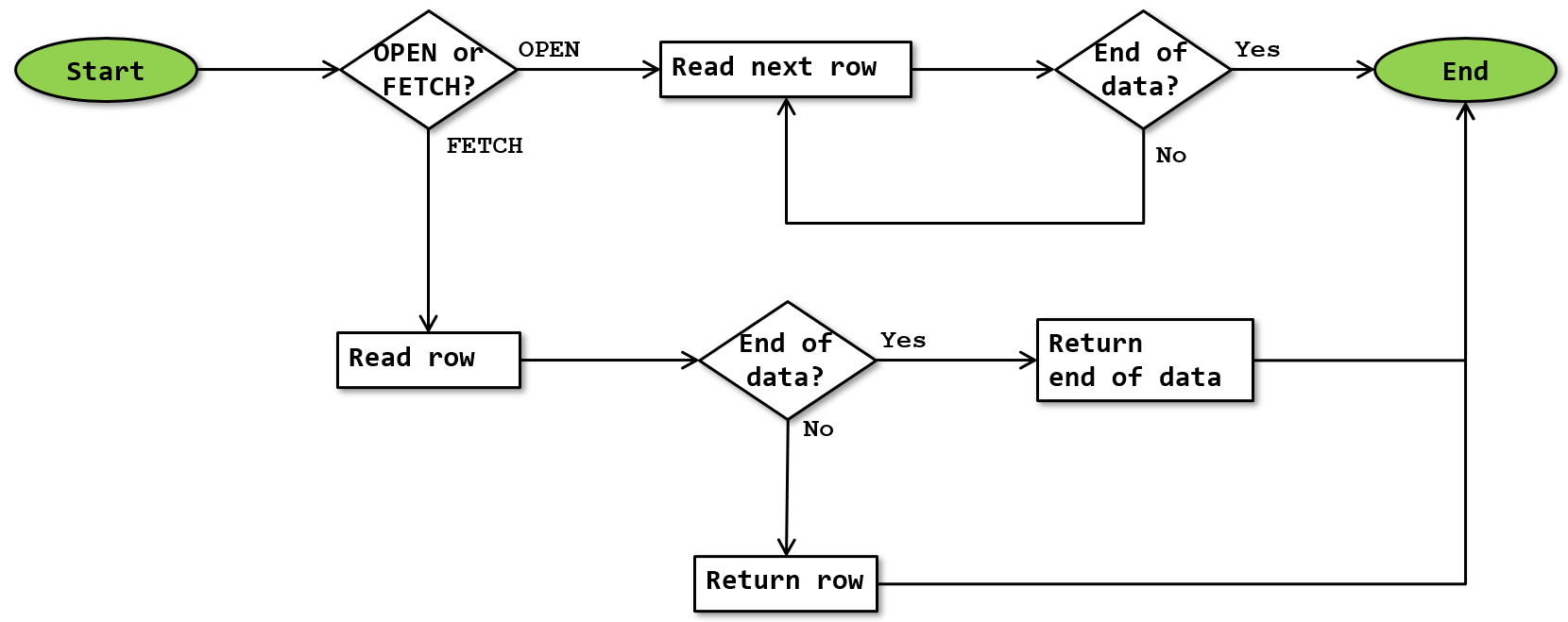
If you do want to imagine the Keyset “operator” executing, the logic would look like this:
 OPEN or FETCH
When the OPEN statement is executed, Keyset invokes its top input, which is always a Population Query “operator”. If this “operator” returns data at all (it probably doesn’t), Keyset simply ignores the returned rows. It keeps invoking the GetNext() method until the end of data signal is received, to ensure that the Population Query finishes populating the internal worktable.
When the FETCH statement is executed, Keyset invokes its bottom input, which is always a Fetch Query “operator”. This “operator” either returns a single row, or the end of data signal. Keyset then passes this to the client.
Future FETCH executions
After the Fetch Query subtree is executed to return a row (or the end of data signal), its operators are not closed. That means that the next execution can automatically continue from the last point, to produce the “next” row in the results. However, for a keyset cursor, the engine always passes in the row number of the row to return, which is used in the execution plan through the FETCH_RANGE internal scalar function.
This is even the case when the Forward Only property is True (usually because the FORWARD_ONLY option is specified in the DECLARE CURSOR statement), even though it would not be required in that case.
Operator properties
Keyset is not an actual operator, but a container for a cursor definition. As such, it has some of the properties that apply to the execution plan as a whole, which can be found here. In addition, it has the following cursor-specific properties:
| Property name | Description |
|---|---|
| Cursor Actual Type | For the Keyset “operator”, this property is equal to “Keyset”. |
| Cursor Concurrency | This property specifies the actual concurrency level of the cursor. Possible values are ReadOnly, Pessimistic, or Optimistic. These correspond with the READ_ONLY, SCROLL_LOCKS, and OPTIMISTIC cursor options respectively. Under certain circumstances, the Cursor Concurrency may be different from the requested concurrency option. |
| Cursor Name | The name assigned to the cursor in the DECLARE CURSOR statement. |
| Cursor Requested Type | The type of cursor that was requested in the DECLARE CURSOR statement. Under certain circumstances, a cursor may be converted from the requested type into a different type. In that case, the Cursor Requested Type will be different from the Cursor Actual Type. |
| Forward Only | When this property is True, the cursor allows only FETCH NEXT statements. If it is False, then all FETCH options are supported. This usually corresponds to the FORWARD_ONLY and SCROLL options in the DECLARE CURSOR statement, unless an unsupported combination was requested and the cursor was converted. |
Change log
(Does not include minor changes, such as adding, removing, or changing hyperlinks, correcting typos, and rephrasing for clarity).
July 7, 2026: Added.