It’s time to continue the series on internals of storage structures. I already covered the more standard storage types in the parts about on-disk rowstore, columnstore indexes, memory-optimized storage, and memory-optimized columnstores, and in the last episode of this series I started to cover specialized storage structures by looking at XML indexes.
Microsoft introduced limited JSON support in SQL Server 2016. However, it took until SQL Server 2025 before the native json data type and JSON indexes were introduced. So let’s look at how these work under the cover.
I have so far not played with JSON data. So I don’t have any demo databases yet that have data of this type. Because I am lazy, I asked Redgate Assistant (a new preview AI tool that is part of Redgate SQLPrompt) to generate a script for me. It took a few tries before it got it right, and the resulting data is rather unrealistic because it chose to use columns that do not actually contain the data that the json schema suggests, but it will do for a demo. Also, apologies for the long script – I asked Redgate Assistant to make the JSON structure more interesting after it first created something basic, and then it went really overboard. But I decided to keep it that way, so I have an interesting demo table to play with. To keep the size limited, Redgate Assistant added a TOP 25 (which of course should have been TOP (25)).
Due to the length of the script (almost 400 lines!), I have decided not to paste the SQL in here. Instead, I have uploaded it to my website. Please click this link to download the setup script.
Creating the index
Given the similarities between XML and JSON, I expect that JSON indexes will also bear similarities to XML indexes. And while that is indeed the case, there are also big differences. We instantly see the first when we want to create the index. The syntax of CREATE JSON INDEX does not mention primary or secondary indexes at all. Instead, it includes just one option that is specific for this index type: OPTIMIZE_FOR_ARRAY_SEARCH.
Not optimized for array search
The default for OPTIMIZE_FOR_ARRAY_SEARCH is off. So let’s first create an index with this default option.
CREATE JSON INDEX ix_json_CustomerProfile_ProfileData
ON dbo.CustomerProfile (ProfileData);
When you run this with the include execution plan plus run-time (aka “actual” execution plan) option enabled, you will see not one but actually two execution plans:
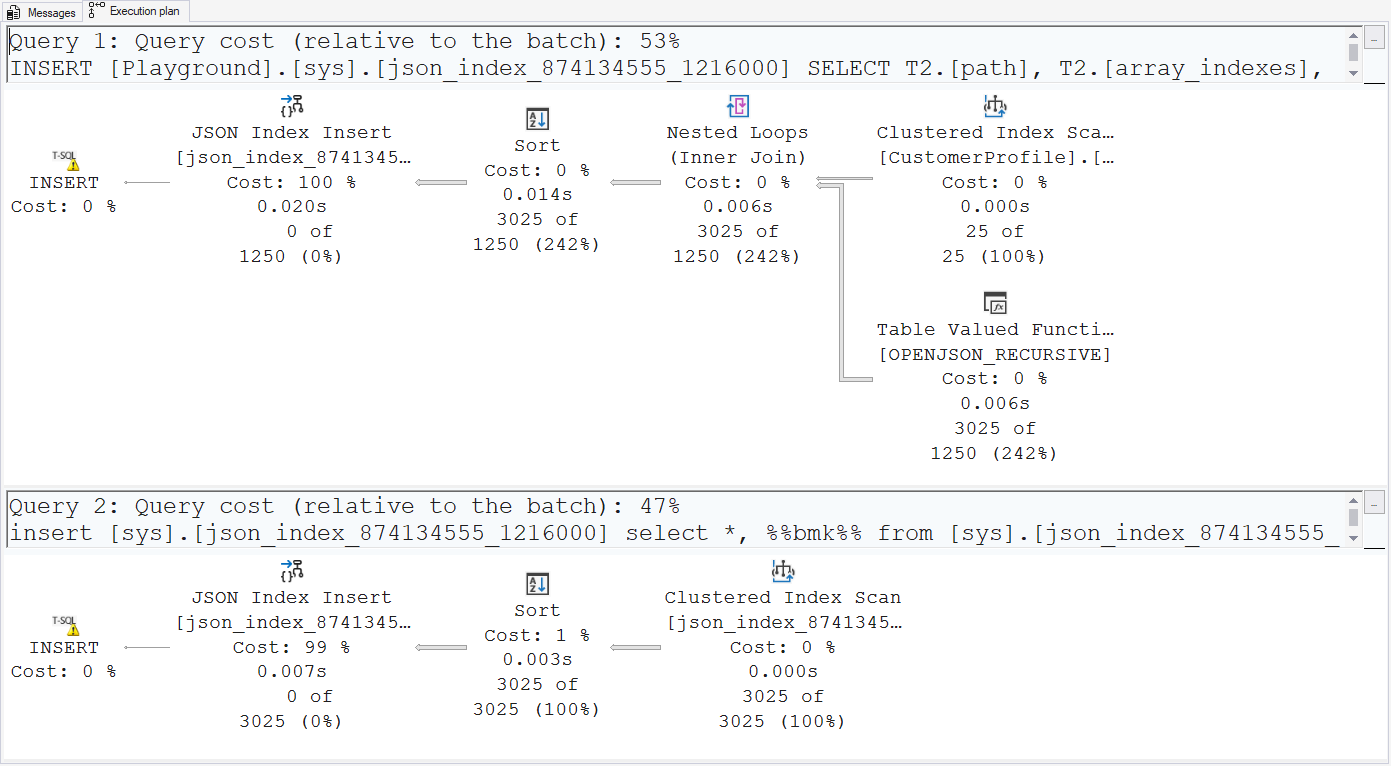
The first execution plan does not need much explanation. The top left Clustered Index Scan reads CustomerID (primary key) and ProfileData (indexed JSON column) from the table. The Nested Loops then pushes the ProfileData into the Table Valued Function operator, that parses the JSON and returns a table with one row for each node in the JSON, with six columns: path, array_indexes, value, status, full_path, and full_value. We’ll get back to these columns later. The optimizer expects 50 nodes per input row; I assume that this is a hard-coded estimate. In this case, the actual average is even more: 121 per input row.
The resulting seven columns (the six from Table Valued Function plus the CustomerID) are then passed into a Sort operator, that orders them by path, array_indexes, and value, to optimize the processing of the JSON Index Insert operator that, as the name suggests, inserts the rows it receives in a new index, called ix_json_CustomerProfile_ProfileData (the name I specified), but defined on a table named json_index_874134555_1216000 (the numbers will likely be different on your system). This betrays that JSON indexes use the same method of creating and indexing an internal node table, that holds a shredded representation of the JSON, with one row for each node.
The second execution plan then starts with another Clustered Index Scan, this time reading the clustered index we just created. It returns five columns: Uniq1001 (which is a uniqueifier column, which betrays that the clustered index created in the first execution plan is defined as not unique), json_path, json_array_index, sql_value, and posting_1. Again, I’ll get back to the columns in the node table later.
This data is then sorted by posting_1, json_path, json_array_index, sql_value, and Uniq1001, before being inserted into another JSON index, also on the same internal node table. This one is named json_index_posting_col_nci on my system. And I suspect on yours as well.
At first sight, it appears as if creating a JSON index has a similar effect as creating a primary XML index plus one secondary XML index, but without a choice of the type of secondary index.
Optimized for array search
Let’s now also look at the execution plans for a CREATE JSON INDEX that adds the OPTIMIZE_FOR_ARRAY_SEARCH = ON clause. Luckily, Redgate Assistant thought ahead and gave me a table with two JSON columns, so we can use a different one this time (SQL Server does not allow you to create two JSON indexes on the same column).
CREATE JSON INDEX ix_json_CustomerProfile_ActivityData
ON dbo.CustomerProfile (ActivityData)
WITH (OPTIMIZE_FOR_ARRAY_SEARCH = ON);
In this case, we see even three execution plans. The first two are exact copies of the execution plans above, except that now the ActivityData column is used and the internal node table is called json_index_874134555_1216001. You will notice the similarity to how SQL Server names node table for XML indexes.
The third execution plan than looks like a copy of the second. The name of the created index is different, though: json_index_search_optimization_nci. Further, the Clustered Index Scan now returns one more column from the node table: status; and the Sort then applies a different sort order: json_path, sql_value, json_array_index, status, and Uniq1001. As with the previous plans, this is to optimize the inserts, so it will correspond to the indexed columns, which will hopefully be confirmed below when we look at the structure of the various tables.
So you might say that adding the OPTIMIZE_FOR_ARRAY_SEARCH = ON clause has a similar effect as creating an extra secondary XML index for XML indexes.
Storage structure
As shown above, the implementation of a JSON index is at a high level very similar to that of XML indexes: an internal and hidden “node table”, with a clustered index and one or two additional nonclustered indexes. The columns in the node table and the definitions of the indexes is different, though.
The query below lists the details of the node tables and their indexes for any table that has one or more indexed XML or JSON columns. (You can optionally add OR o.object_id = OBJECT_ID (‘dbo.CustomerProfile’) to also get information about regular indexes on the same table).
SELECT     o.object_id               AS [Object ID],
           SCHEMA_NAME (o.schema_id) AS [Schema name],
           o.name                    AS [Object name],
           o.parent_object_id        AS [Parent object ID],
           o.type_desc               AS [Object type],
           i.name                    AS [Index name],
           i.type_desc               AS [Index type]
FROM       sys.indexes AS i
INNER JOIN sys.objects AS o
   ON      o.object_id = i.object_id
WHERE      o.parent_object_id = OBJECT_ID ('dbo.CustomerProfile');
Here is the output I got on my system. Again, the Object ID values, and hence also the Object name, will be different on your system.

Node table
To find out which columns are included in the node table and how the clustered index is defined, we can use the same query that I also used in the previous episode:
SELECT     c.name         AS ColumnName,
           t.name         AS Datatype,
           CASE
               WHEN c.max_length = -1 THEN
                   'MAX'
               ELSE
                   CAST (c.max_length AS varchar(30))
           END            AS MaxLength,
           ic.key_ordinal AS [Clustered index column]
FROM       sys.indexes       AS i
INNER JOIN sys.columns       AS c
   ON      c.object_id    = i.object_id
INNER JOIN sys.types         AS t
   ON      t.user_type_id = c.user_type_id
LEFT JOIN  sys.index_columns AS ic
  ON       ic.object_id   = i.object_id
  AND      ic.index_id    = i.index_id
  AND      ic.column_id   = c.column_id
WHERE      i.name = N'ix_json_CustomerProfile_ActivityData'
AND        i.type_desc   = N'CLUSTERED'
ORDER BY   c.column_id;
These are the results:
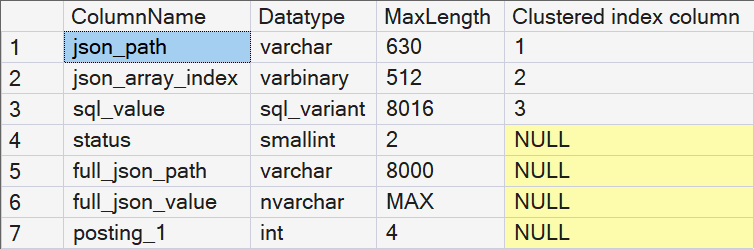
Because it is an internal table, it cannot be queried directly. Unless I connect using the dedicated administrator connection (DAC). On production servers, this connection should only be used when absolutely needed, to recover from certain emergencies when regular connection are no longer possible. But on my test and demo laptop, I think I can justify abusing the DAC to look at the internals of this table. Here is a screenshot that shows part of the output.
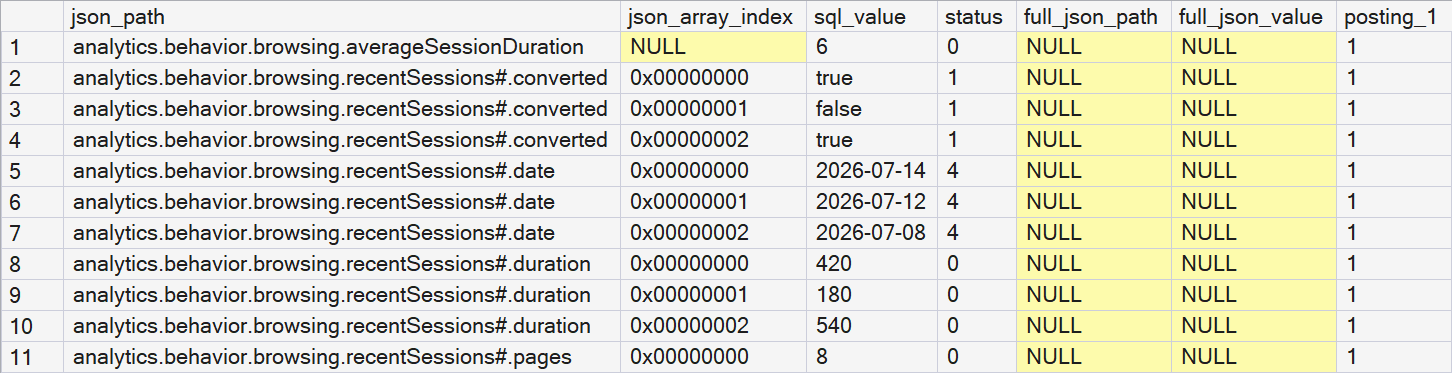
If you compare this output to the JSON in the ActivityData column of the row with CustomerID 1, you can start to interpret what some of these columns mean.
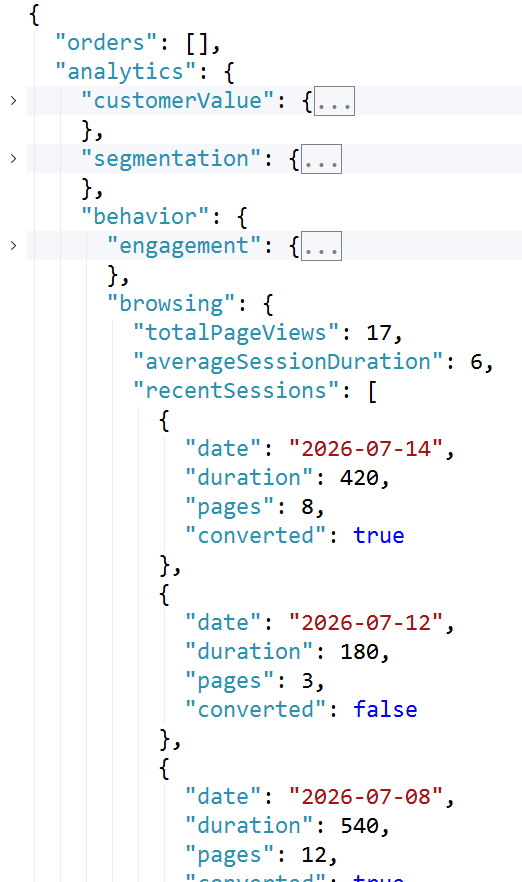
My first observation is an interesting difference with XML indexes. Where an XML node table includes a row for each row, the JSON node table only contains a row for each name/value pair. Empty elements, such as the empty “orders” array in the screenshot above, are completely missing from the node table.
Based on comparison between the data in the node table to the JSON, plus some additional experiments that I won’t describe in detail here, I have deducted these meanings for the columns in the node table:
| json_path | The path to the name/value pair, where all parts are separated by periods, names of arrays are appended with a # symbol, and the last part is always the name of the name/value pair. |
| json_array_index | For elements in an array, this is a zero-based number to indicate the ordinal position in the array. For elements not in array, this is NULL. For nested arrays, the array index is computed by shifting each next level left by 8 bytes and doing a binary OR (which is equivalent to multiplying each next level by 4,294,967,296 and adding the values). With the varbinary(512) data type, this allows for With the varbinary(512) data type, this allows for 4,294,967,296 elements in each array, and 64 levels of nesting. I have not tested what happens when these limits are exceeded. However, I did try a query that asks for the 4,294,967,297th element, and that throws an error. So I assume that a JSON string that includes an array with more than 4,294,967,296 elements would also throw an error. |
| sql_value | This is the value in a name/value pair, or the value of an array literal. |
| status | I think this represents the data type of the value in the JSON string. The values I have observed so far are 0 for numerical data (and null values), 1 for Boolean data, 2 for large object data, and 4 for string data. |
| full_json_path | If the full path to a name/value pair is more than 630 characters, then the json_path value stores a truncated version of the path. The full path is then stored in this column. If the full path is 630 or less characters, this column remains NULL. |
| full_json_value | If the full value of a name/value pair exceeds the storage limits of the sql_variant data type (8016 bytes), then the sql_value stores a truncated version of the value. The full value is then stored in this column. If the full value fits in the sql_value column, this column remains NULL. |
| posting_n | One or more columns with the primary key values of the corresponding data row. |
I realize that the above table contains a some guesswork and blank spots. Please contact me if you can provide any additional information!
Indexes
Let’s now look at the indexes that are created on this node table. The clustered index is easy.
Clustered index
We already saw above that the clustered index on this node table is on a combination of three columns: json_path, json_array_index, and sql_value. The first two columns allow for easy searches based on a given JSON path, and adding the sql_value then facilitates seeks for queries where a specific path has to be a specific value.
We see examples in these two sample queries, where the first uses a value from a simple object, whereas the second gets a value from a name/value pair in an array.
SELECT CustomerName,
       ActivityData
FROM   dbo.CustomerProfile
WHERE  JSON_VALUE (ActivityData,
                   '$.analytics.behavior.browsing.totalPageViews') = 102;

SELECT CustomerName,
       ActivityData
FROM   dbo.CustomerProfile WITH (INDEX = ix_json_CustomerProfile_ActivityData)
WHERE  JSON_VALUE (ActivityData,
                   '$.analytics.behavior.browsing.recentSessions[1].duration') = 10;
The two execution plans looks similar in the graphical representation, the differences are only in the properties. So I will only show one of the two here:
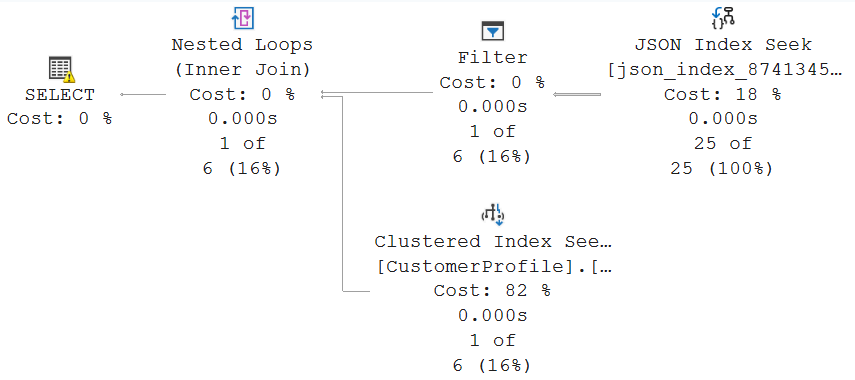
The Object property of the JSON Index Seek operator shows that it searches in the index ix_json_CustomerProfile_ActivityData on internal table sys.json_index_874134555_1216001. This is indeed the clustered index on the node table.
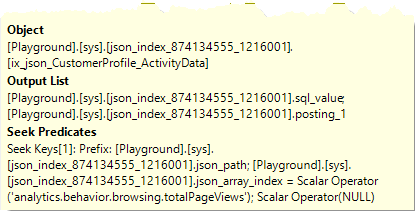
I was surprised to see the Seek Predicates property. Apparently, the JSON Index Seek only uses the json_path (set to the specified path) and json_array (set to NULL for the first query and to 1 for the second query) to find all rows that have a node with the specified path. Even though the sql_value column is also indexed, it is not used to narrow down the search any further.
As a result, all 25 rows are returned to the Filter operator, which then removes the 24 non-matching rows in the first query, and even all 25 in the second. The rest of the execution plan is fairly basic: Nested Loops pushes column posting_1 (the primary key column) into a Clustered Index Seek to fetch the ActivityData that the query requests.
The reason why the second query needs a hint becomes clear when you look at the Estimated Number of Rows property of the Filter operator. For the first query, the optimizer estimates that just 5.9 rows match the filter. For the second query, the estimate is 16.4. With such a high estimate, the optimizer expects that the 16.4 executions of the Clustered Index Seek will cost more than just doing a full Clustered Index Scan on the table, computing the JSON_VALUE expression directly from the JSON column itself, and then filtering on that. Surprisingly, that execution plan that comes back with an Estimated Number of Rows of just 1.
I have not tried to understand where these estimates come from. I also have not tried to understand why the filter on the sql_value column, the third indexed column, was not pushed into the JSON Index Seek operator. That would have made the execution plan cheaper.
Nonclustered index json_index_posting_col_nci
Every JSON index created results in not only an internal node table with a clustered index, but also at least one nonclustered index on that same node table. This index is always named the same: json_index_posting_col_nci. That name already suggests that this index is on the posting column(s), which are the columns that link back to the primary key of the base table. But let’s not assume. Let’s verify.
SELECT     c.name         AS ColumnName,
           t.name         AS Datatype,
           CASE
               WHEN c.max_length = -1 THEN
                   'MAX'
               ELSE
                   CAST (c.max_length AS varchar(30))
           END            AS MaxLength,
           ic.key_ordinal AS [Clustered index column]
FROM       sys.indexes       AS i
INNER JOIN sys.columns       AS c
   ON      c.object_id    = i.object_id
INNER JOIN sys.types         AS t
   ON      t.user_type_id = c.user_type_id
INNER JOIN sys.index_columns AS ic
   ON      ic.object_id   = i.object_id
   AND     ic.index_id    = i.index_id
   AND     ic.column_id   = c.column_id
WHERE      i.object_id = OBJECT_ID ('sys.json_index_874134555_1216001')
AND        i.name             = N'json_index_posting_col_nci'
ORDER BY   c.column_id;
The output confirms that, indeed, this index is on the posting_1 column only. For a base table with a composite primary key, this would be all primary key columns, named posting_1, posting_2, etc. in the node table.

So I expect this index to be used when I want to access JSON elements from one or more specific rows in the table. Because we specify a filter on the primary key, or another filter that the optimizer expects to be sufficiently selective.
However, I have not been able to get the optimizer to actually produce a query plan that uses this index. Every selective query I tried preferred to use a Clustered Index Seek on the main table and then regular Compute Scalar operators to extract the requested JSON_VALUE expressions. And that makes sense, when I think about it. After all, an Index Seek on this index would return one row for each name/value pair in the JSON. So even while the relatively expensive processing of the JSON_VALUE function could be avoided by reading from the node table, the higher number of rows makes that less attractive.
I didn’t want to keep spending time to find a query that does result in an execution plan that uses this index. If you find any, please let me know.
I personally think that this index would have been more useful if at least the json_path and json_array_index columns would have been added as the second and third indexed column. That would have made this index extremely useful for a simple sample query such as this:
SELECT JSON_VALUE (ActivityData,
                   '$.analytics.behavior.browsing.totalPageViews')
FROM   dbo.CustomerProfile WITH (INDEX = ix_json_CustomerProfile_ActivityData)
WHERE  CustomerID = 2;
Nonclustered index json_index_search_optimization_nci
If you add the OPTIMIZE_FOR_ARRAY_SEARCH = ON option when creating a JSON index, then SQL Server will create one more nonclustered index on the internal node table. This index is always named json_index_search_optimization_nci. This name hints at the intended usage of the index, but not at the indexed columns. So let’s once more run this query:
SELECT     c.name         AS ColumnName,
           t.name         AS Datatype,
           CASE
               WHEN c.max_length = -1 THEN
                   'MAX'
               ELSE
                   CAST (c.max_length AS varchar(30))
           END            AS MaxLength,
           ic.key_ordinal AS [Index column]
FROM       sys.indexes       AS i
INNER JOIN sys.columns       AS c
   ON      c.object_id    = i.object_id
INNER JOIN sys.types         AS t
   ON      t.user_type_id = c.user_type_id
INNER JOIN sys.index_columns AS ic
   ON      ic.object_id   = i.object_id
   AND     ic.index_id    = i.index_id
   AND     ic.column_id   = c.column_id
WHERE      i.object_id = OBJECT_ID ('sys.json_index_874134555_1216001')
AND        i.name             = N'json_index_search_optimization_nci'
ORDER BY   c.column_id;
Here are the results I got from this query:
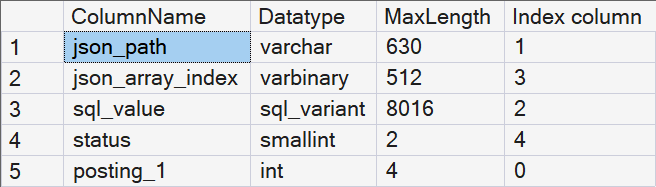
We see that this index is a composite index, on no less than four columns: json_path, sql_value, json_array_index, and status, in that order. Also, posting_1 (and other posting_n columns if they exist) is added as an included column, to prevent lookups when this index is used to retrieve the primary key of a column.
The ordering of the columns in the index, especially putting sql_value before json_array_index, suggests that this index can be very effective when searching for a specific value in an array in the JSON where a wildcard expression is used for the array index. Such as in the example below.
SELECT CustomerName,
       JSON_QUERY (ActivityData,
                   '$.metadata.quality.validationRules[*]' WITH ARRAY WRAPPER)
FROM   dbo.CustomerProfile WITH (FORCESEEK)
WHERE  JSON_CONTAINS (ActivityData,
                      'phone_format',
                      '$.metadata.quality.validationRules[*]') = 1;
I once more had to resort to a hint because the optimizer, correctly in this case, estimates that all 25 rows will match. (And I once more see this strange behavior that in the hinted plan, the estimates change).
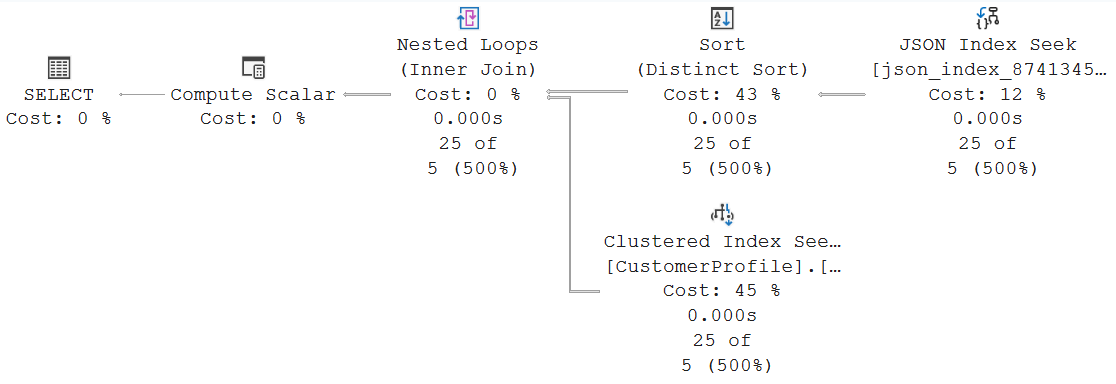
We once more need to look at the properties of the JSON Index Seek operator to confirm that it does indeed target the json_index_search_optimization_nci index:
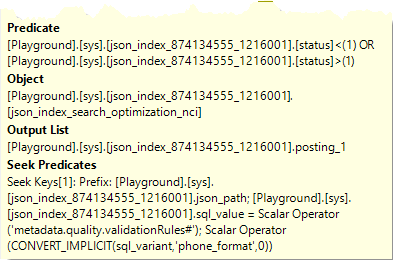
The Seek Predicates property confirms that a direct seek is done based on the json path and the value we are looking for. The [*] wildcard in the JSON expression means we want all entries, so we can’t filter on the third indexed column, json_array_index. That also means that the predicate on the fourth indexed column, status, can’t be handled in the Seek Predicates and has to move to a Predicate expression instead.
The Sort operator that follows is because JSON allows an array to contain the same element twice. The JSON Index Seek operator would in that case return both, so we would get two rows returned for the same row in the base table. Sort (Distinct Sort) fixes that by sorting by primary key and then removing any duplicates found. The rest of the execution plan has no surprises.
Interestingly, when you change the query above to look only in array element [1] instead of the wildcard [*], the array search index is still used. But now the Seek Predicates property adds a predicate on json_array_index = 1, and this also means that the predicate that status must not be 1 is now moved from the Predicate property to the Seek Predicates as well. Also, because we now specify the exact array index, we can’t get the same row back more than once, so the Sort (Distinct Sort) operator is gone as well.
Conclusion
At a helicopter view level, the architecture of JSON indexes is similar to that of XML indexes: an internal node table that holds the shredded contents of the JSON column, with a clustered index and additional nonclustered indexes. But when looking deeper, it’s mostly the differences that stand out.
Where the node table of an XML index includes all the nodes in the XML, the node table of a JSON index includes only the values (name/value pairs and unnamed values in an array).
For an XML index, you have full control over the nonclustered indexes defined, by choosing which secondary XML indexes to create. For a JSON index, one type of nonclustered index is always created; the other type may or may not be created, depending on the OPTIMIZE_FOR_ARRAY_SEARCH option in the CREATE JSON INDEX statement.
The columns and values in the internal node table, and the indexed columns in the clustered and nonclustered indexes are completely different between the two, which also means that their use cases are not comparable.
And finally, while not explicitly called out in the main text, you could see from the execution plans that Microsoft has decided to create specific operators for dealing with JSON indexes, such as the JSON Index Insert and JSON Index Seek. For XML indexes, that are also implemented as regular clustered and nonclustered indexes on an internal table, the execution plan shows a regular Index Insert or Index Seek operator in such a case, and you can only see that the target is an XML index by looking at the Index Kind subproperty of the Object property group.
The next episode in this series on storage structures will look at spatial indexes. Unless I change my mind.