After covering on-disk rowstore, columnstore indexes, memory-optimized storage, and memory-optimized columnstores, it is now time to turn our attention to storage structures that are used for specific datatypes only. The first “victim” will be the XML index.
When you need to store XML data in a SQL Server database, you can choose between two data types, each with their pros and cons. You can choose to store the XML data as nvarchar(max). This preserves the exact content of the XML as you received it, which might be required for legal reasons. However, any query that cares about the specific content of the XML data will have to resort to very complicated string expressions.
The xml data type shreds the XML and stores the content in an internal format, that allows SQL Server to work with for instance XQuery or XPath expressions. This format also saves space as compared to the nvarchar(max) alternative. However, when you query the data, the content will be the same, but formatting and whitespace might be different.
You can use XQuery and XPath on any data that has the xml data type. But for frequently filtered columns, this might be slow. To speed up those queries, you can create XML indexes.
This blog does not describe the internals of how the xml data type is stored. It focuses only on the XML indexes, that can optionally be defined on top of an xml column in a table.
Four types
SQL Server supports no less than four types of XML index: primary XML index, and three types of secondary XML index (PATH, VALUE, and PROPERTY). A secondary XML index can only be created on an xml index that already has a primary XML index.
It is also possible to create selective XML indexes. These contain only a subset of the content of the indexed XML data. The actual storage structure of the data is not affected, though.
Primary XML index
The primary XML index is also called a node table. This index stores a copy of all the data in the indexed XML column, along with a link to the row where the data comes from.
Let’s look at the details. There are already a few XML indexes in the AdventureWorks sample database, but let’s create our own, just because we can. The Resume column in the HumanResources.JobCandidate table is XML, but not indexed. So the only type of XML index we can create is a primary XML index:
CREATE PRIMARY XML INDEX PXML_Jobcandidate_Resume
ON HumanResources.JobCandidate (Resume);
After running this, we can query sys.indexes to see the properties of this index:
SELECT     o.object_id               AS [Object ID],
           SCHEMA_NAME (o.schema_id) AS [Schema name],
           o.name                    AS [Object name],
           o.parent_object_id        AS [Parent object ID],
           o.type_desc               AS [Object type],
           i.name                    AS [Index name],
           i.type_desc               AS [Index type]
FROM       sys.indexes AS i
INNER JOIN sys.objects AS o
   ON      o.object_id  = i.object_id
WHERE      i.name       = N'PXML_Jobcandidate_Resume';
When you run this, you might be surprised to see not one, but two rows in the results!

The first row is the one we expected. An index with index type XML, defined on the object HumanResources.JobCandidate. However, there is also a second row. This index has the same name, is listed as a clustered index, and is defined on an object that is classified as “internal table”, and named “xml_index_nodes”, followed by the object ID of the JobCandidate table and then a number that, as far as I can tell, starts at 256000 and is increased for each additional primary XML index on the same table. This internal table also has a non-zero value in the Parent object ID column. The value here is exactly the object ID of the JobCandidate table.
This internal table is the node table. In this table, all the nodes from the XML content in JobCandidate are stored, in a different format. Because it is an internal table, we can’t query it. We can peek at its structure, though:
SELECT     c.name         AS ColumnName,
           t.name         AS Datatype,
           CASE
               WHEN c.max_length = -1 THEN
                   'MAX'
               ELSE
                   CAST (c.max_length AS varchar(30))
           END            AS MaxLength,
           ic.key_ordinal AS [Clustered index column]
FROM       sys.indexes       AS i
INNER JOIN sys.columns       AS c
   ON      c.object_id    = i.object_id
INNER JOIN sys.types         AS t
   ON      t.user_type_id = c.user_type_id
LEFT JOIN  sys.index_columns AS ic
  ON       ic.object_id   = i.object_id
  AND      ic.index_id    = i.index_id
  AND      ic.column_id   = c.column_id
WHERE      i.name = N'PXML_Jobcandidate_Resume'
AND        i.type_desc   = N'CLUSTERED'
ORDER BY   c.column_id;
This results in the following output:
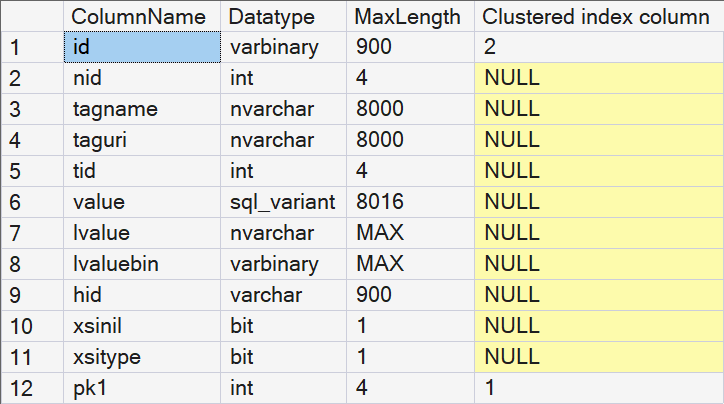
So we now know the twelve columns, their names, and their data types. But most of the names are rather cryptic. Some allow for some guesswork as to what the contents might be, but most seem totally meaningless.
Now, when I said before that we can’t query an internal table, I was lying a bit. We normally cannot do that. But there is an exception. Connections that are made on the dedicated administrator connection (DAC) can query internal tables!
So I connected to the DAC and ran this query. (You may need to change the exact name of the node table).
SELECT *
FROM   sys.xml_index_nodes_722101613_256000;
This returns 1,046 rows. That is quite impressive, considering that the JobCandidate table has just 13 rows! The reason is that each of the 13 XML values in the table gets shredded into its components. Every element, attribute and value becomes a row in the nodes table.
I have tried to infer the meaning of each column in the nodes table by looking at the content of actual nodes tables and comparing it to the corresponding XML fragment. So far, I have assigned the following meaning to each column:
| id | This appears to be a binary encoding of the path to the node, extended with an extra value for attributes added. |
| nid | This seems to be an identifier of the element. If an element is repeated, this value does not change. |
| tagname | Unknown, I have so far only observed null values in this column. |
| taguri | Unknown, I have so far only observed null values in this column. |
| tid | For elements in typed XML, this is a reference to the xml_component_id in sys.xml_schema_types. For attributes in typed XML, this seems to be an indicator of the datatype. In untyped XML, this is always null. |
| value | Stores the value of an attribute or the content of an element. |
| lvalue | Same as value, but only for values that are long strings. |
| lvaluebin | Probably the same as value for blob-type values. |
| hid | This is an encoded representation of the path to the node. |
| xsinil | Based on the name, I expected this to be True for elements that use xsi:nil=”true”. However, in my tests, these were stored as an attribute named xsi:nil, with value “true”, and the xsinil column remained 0. I have not observed any 1 values in this column. |
| xsitype | Based on the name, I expected this to be True for elements that use the xsi:type attribute. However, in my tests, these were stored as an attribute named xsi:type, with the supplied type as the value, and the xsitype column remained 0. I have not observed any 1 values in this column. |
| pkn | One or more columns with the primary key values of the corresponding data row. |
I realize that the above table contains a lot of guesswork and blank spots. Please contact me if you can provide any additional information!
Bottom line is: a primary XML index is just an ordinary clustered index, on a table that represents all nodes, elements, and attributes from the XML content in 11 columns, plus one or more columns to link back to the primary key of the table. The clustered index key columns are those primary key columns plus the id column, which represents the path of each node, element, or attribute.
Secondary XML index
To take a deeper look at secondary XML indexes, I will not create my own, but instead use an existing table in AdventureWorks, Person.Person. This table has two XML columns, AdditionContactInfo and Demographics. Both have a primary XML index, but the Demographics columns also has all three types of secondary XML index.
SELECT     o.object_id               AS [Object ID],
           SCHEMA_NAME (o.schema_id) AS [Schema name],
           o.name                    AS [Object name],
           o.parent_object_id        AS [Parent object ID],
           o.type_desc               AS [Object type],
           i.name                    AS [Index name],
           i.type_desc               AS [Index type]
FROM       sys.indexes AS i
INNER JOIN sys.objects AS o
   ON      o.object_id = i.object_id
WHERE      o.parent_object_id = OBJECT_ID (N'Person.Person')
OR         o.object_id               = OBJECT_ID (N'Person.Person');
The results shows the three expected regular indexes and five XML indexes. But we also once more see five indexes on internal tables. If you look at the Object ID column, you will see that these are on just two internal tables.
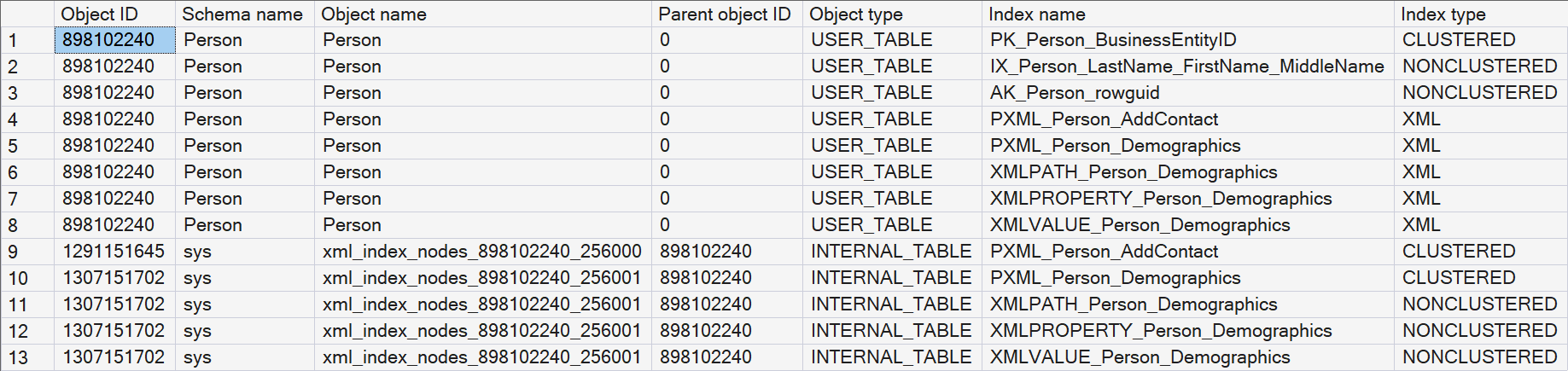
This betrays that, where the primary XML index is implemented as a clustered index on the node table, every secondary XML index is then a nonclustered index on that same table, allowing SQL Server to effectively search on other parts of the XML.
You may notice that there is nothing in the query results that indicates the type of secondary index. In this case, you can infer it from the naming convention Microsoft chose to use, but that is never guaranteed. So if you find a secondary XML index and need to find the type, you can instead query sys.xml_indexes:
SELECT name,
       xi.index_id,
       xi.type_desc,
       xi.xml_index_type_description,
       xi.using_xml_index_id,
       xi.secondary_type_desc
FROM   sys.xml_indexes AS xi
WHERE  xi.object_id = OBJECT_ID (N'Person.Person');
This returns the following data:

Details by type of secondary XML index
So we know that the primary XML index is a node table with a clustered index, and all secondary XML indexes are nonclustered indexes on that same node table. That means that only one question remains: what are the indexed columns in these secondary XML indexes?
We can find out by using a simplified version of the query I used to check the details of the primary XML index. For instance, the query below finds the details of the PATH index:
SELECT     c.name         AS ColumnName,
           ic.key_ordinal AS [Index column]
FROM       sys.indexes       AS i
INNER JOIN sys.columns       AS c
   ON      c.object_id    = i.object_id
INNER JOIN  sys.index_columns AS ic
  ON       ic.object_id   = i.object_id
  AND      ic.index_id    = i.index_id
  AND      ic.column_id   = c.column_id
WHERE      i.name = N'XMLPATH_Person_Demographics'
AND        i.type_desc   = N'NONCLUSTERED'
ORDER BY   ic.key_ordinal;
This returns the following:
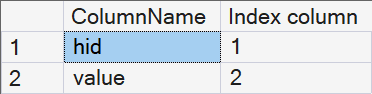
Using that same query, I have looked at each of the three types to determine what the indexed columns are.
PATH index
As shown above, a PATH index is implemented as a nonclustered index on the hid and value columns. Since hid is an encoded representation of the path to a node, this makes it ideal for queries such as this, that filter on the presence of a specific node:
WITH XMLNAMESPACES ('http://schemas.microsoft.com/sqlserver/2004/07/adventure-works/IndividualSurvey' AS ns)
SELECT BusinessEntityID,
       LastName,
       Demographics
FROM   Person.Person
WHERE  Demographics.exist ('/ns:IndividualSurvey/ns:NumberCarsOwned') = 0;
The execution plan is as shown below:
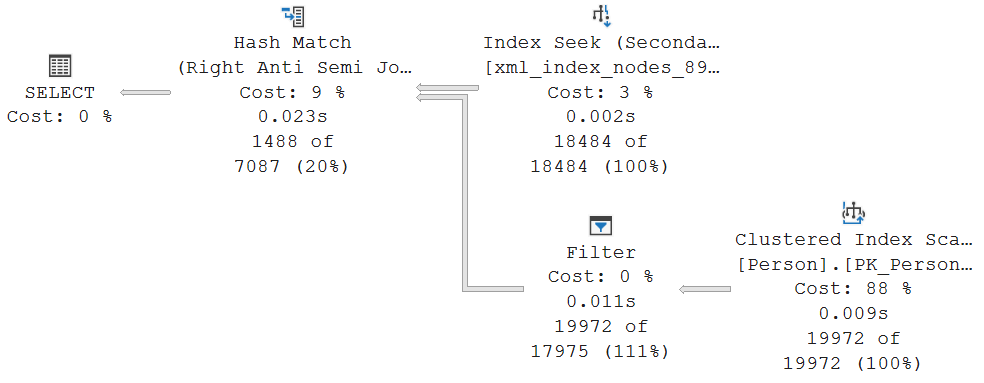
The interesting part is the top input to the Hash Match operator. The properties of the Index Seek show what exactly happens here:
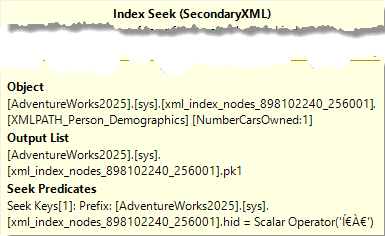
The Object property shows that this Index Seek uses the PATH secondary index. The Seek Predicates property then shows what exactly is returned: all rows with the hid column equal to some weird unprintable characters. If you followed along and used the Dedicated Administrator Connection to query the contents of the node table, you will recognize this as the kind of values that are in the hid column, the encoded representation of the path. So this value ̀ is the encoded representation of /ns:IndividualSurvey/ns:NumberCarsOwned. Out of a node table with, in this case, over 300,000 rows, only the 18,484 NumberCarsOwned nodes are returned.
The bottom input to the Hash Match is unsurprising. A simple Clustered Index Scan on the Person table, plus a Filter to remove rows that have NULL in the Demographics column. I must admit that I don’t know why this filter has not been pushed into the scan, but this has only a minor effect on performance.
The Hash Match then joins these two inputs, using Right Anti Semi Join as its Logical Operation. This means that only rows from the bottom input are retained that do not have a match in the top input. This of course reflects the .exist = 0 filter.
VALUE index
Using the same method as before, you will see that a VALUE index is implemented as a nonclustered index on columns value and hid. You will notice that these are the same columns that are also used in a PATH index, but in reversed order. That makes a VALUE index the ideal tool to search for specific values in the XML, such as in the query below:
WITH XMLNAMESPACES ('http://schemas.microsoft.com/sqlserver/2004/07/adventure-works/IndividualSurvey' AS ns)
SELECT BusinessEntityID,
       LastName,
       Demographics
FROM   Person.Person
WHERE  Demographics.exist ('/ns:IndividualSurvey/ns:Education[.="Bachelors "]') = 1;
This is executed with the following execution plan:
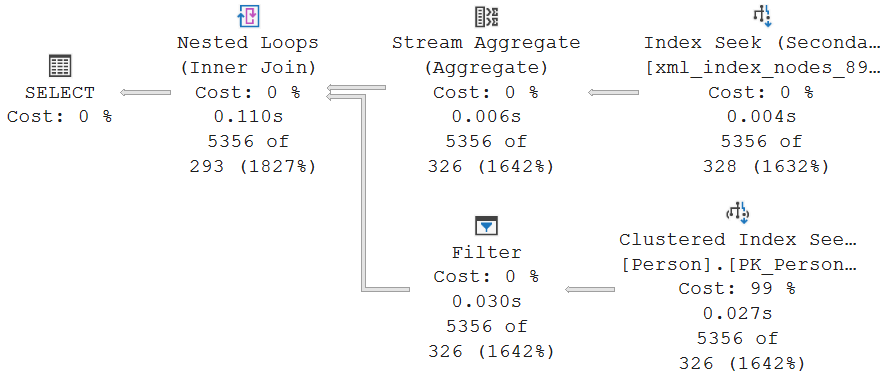
In this case, a Nested Loops join is chosen, due to the lower cardinality estimates. The top input once more is an Index Seek, but now on the VALUE index.
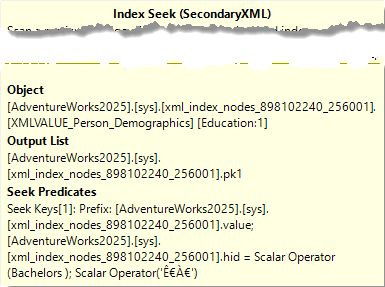
The Seek Predicates property shows that both the value (Bachelors, with trailing space) and the node path (once more encoded, as ʀ) are passed in. This means that the PATH index could have been used as well. I am sure that there are better examples for the benefit if a VALUE index, but my XML knowledge is limited and I gave up after trying for an hour or so. Feel free to reach out if you have a good example query that showcases a more relevant usage of this secondary XML index type.
The Output List shows that only the primary key value of the corresponding rows in the Person table is returned. The Nested Loops then executes its bottom branch for each value passed in, executing a Clustered Index Seek to retrieve that row, plus once more a Filter to remove the row if the Demographics column in null. Since only primary key values are passed in that meet the requirement of having a Bachelors degree in their Demographics, this Filter is actually useless.
PROPERTY index
The last type of secondary XML index is not on two, but on three columns: pk1, hid, value. If you would try this on a table with a composite primary key, then pk2, pk3, etc would also be indexed, after pk1 but before hid.
With pk1 being the leading column, this index is especially beneficial when the row in the underlying table is already known, but a specific path needs to be extracted. So I would expect the PROPERTY index to be used for a query such as this:
WITH XMLNAMESPACES ('http://schemas.microsoft.com/sqlserver/2004/07/adventure-works/IndividualSurvey' AS ns)
SELECT BusinessEntityID,
       LastName,
       Demographics,
       Demographics.value ('/ns:IndividualSurvey[1]/ns:Education[1]', 'varchar(30)')
FROM   Person.Person
WHERE  BusinessEntityID = 3206;
The graphical execution plan looks like this:
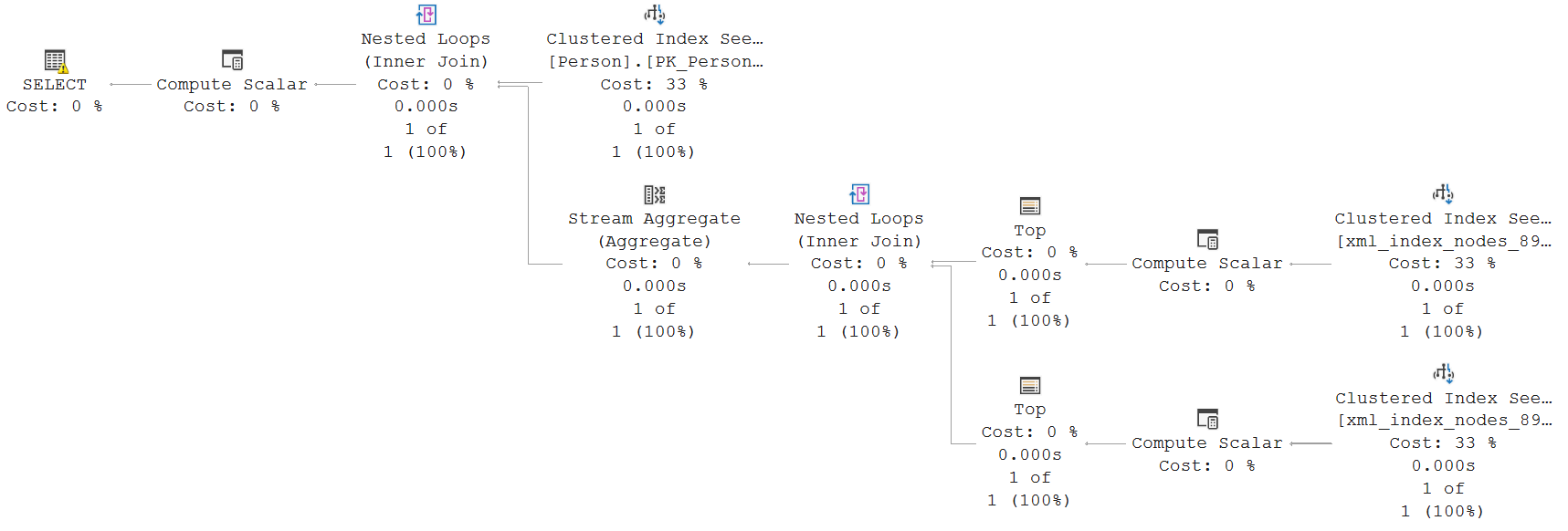
While this execution plan looks daunting in comparison to the others, it is not as complex as it might seem. The top Clustered Index Scan simply reads the regular relational data for the row with the specified primary key value. Nothing special here.
The bottom branch to the first Nested Loops then starts with a Clustered Index Seek on the primary XML index (you can’t see that in the graphical execution plan, but it becomes clear when you hover the operator and check its Object property – although the fact that this is a Clustered Index Seek is also an indicator). The Seek Predicates shows that only rows for the specified primary key value are read, with an additional Predicate filter on the hid column, to return only the requested row (which is in this case only IndividualSurvey – or À€ in the encoded format).
To understand why a Clustered Index Seek on only pk1 is used, instead of an Index Seek on the combination of pk1 plus hid, the first two columns of that index, you need to look at the Output List property. The id, hid, and pk1 columns are retunred. But id is not included in the PROPERTY index, so this would necessitate a Key Lookup. The optimizer apparently considered that too expensive, and chose to use the clustered index instead. The Actual Rows Read property shows that it had to scan through just 2 rows in the node table to find the single row we were looking for. This is indeed cheaper than an Index Seek plus Key Lookup would be.
The Compute Scalar seems to make little sense. It computes a new column, Expr1007, and sets it to the hardcoded value 0x58. But that column is then not used anywhere in the rest of the execution plan. So I don’t know why this is done.
The Top operator implements the [1] in the /ns:IndividualSurvey[1] specification. If you change this to a higher value, you will see that this gets replaced by a combination of Segment and Sequence Project (to compute a row number), followed by a Filter, to retain only the rows where the row number matches the specification.
At the end of this branch, only the id value is left (as you can see in the Output List of Top). This is passed to Nested Loops, which then uses Outer References to push this value in the bottom branch.
In that bottom branch, we see yet another Clustered Index Seek on the primary XML index. This time, the Seek Predicates searches on pk1, but also on the id column. This is a range seek that returns all rows (within the specified primary key) that have an id value between the id of the IndividualSurvey[1] node, and the value computed by the getdescendantlimit internal scalar function, that returns the highest numbered subnode of that same node. So this returns all sub-nodes of IndividualSurvey[1]. The additional Predicate filter then narrows this down to the full specified path (the by now familiar value Ê€À€), and does a (redundant, if I’m not mistaken) test to check that the getancestor internal function for this node returns the id of the /ns:IndividualSurvey[1] node.
The rest of this branch are the same Compute Scalar and Top that we also saw in the other branch. No further explanation is needed here.
So while this was an interesting execution plan to discuss, to show how, in this case, a primary XML index can be used, it does not show the usage of a PROPERTY index. I have not been able to construct a demo query that does use this index. Again, this is most likely due to my very limited understanding of XML, XQuery, and XPath. Once more, all suggestions are welcome. I would be very happy to receive feedback with sample queries where the PROPERTY index does get used.
Conclusion
All the queries shown in this post can also be used without first creating any XML indexes. This will result in execution plans that use a combination of Table Valued Function and UDX operators to return the requested results. But this is slow. So for frequently queried XML columns, it makes sense to create one or more XML indexes.
These are not black magic. A primary XML index is simply a node table that holds one row for each node in the XML data, and that is organized as a clustered index. Any secondary XML index is then a nonclustered index on that same node table, where the indexed columns are chosen to benefit certain query types.
The optimizer looks at all XQuery and XPath expressions in a query to come up with the (hopefully) best access path, using either the primary XML index, or any of the secondary XML indexes that are available. This results in an execution plan that shows simple seek and scan operators on those internal indexes.
I was not able to create good examples of the usage of these indexes for all index types, probably due to my lackluster grasp on XML, XQuery, and XPath. Your help is welcome!
For now, I plan to divert my attention to an area that I have even less experience in: JSON. JSON indexes are available since SQL Server 2025, so my plan is to investigate how those are stored and used.